
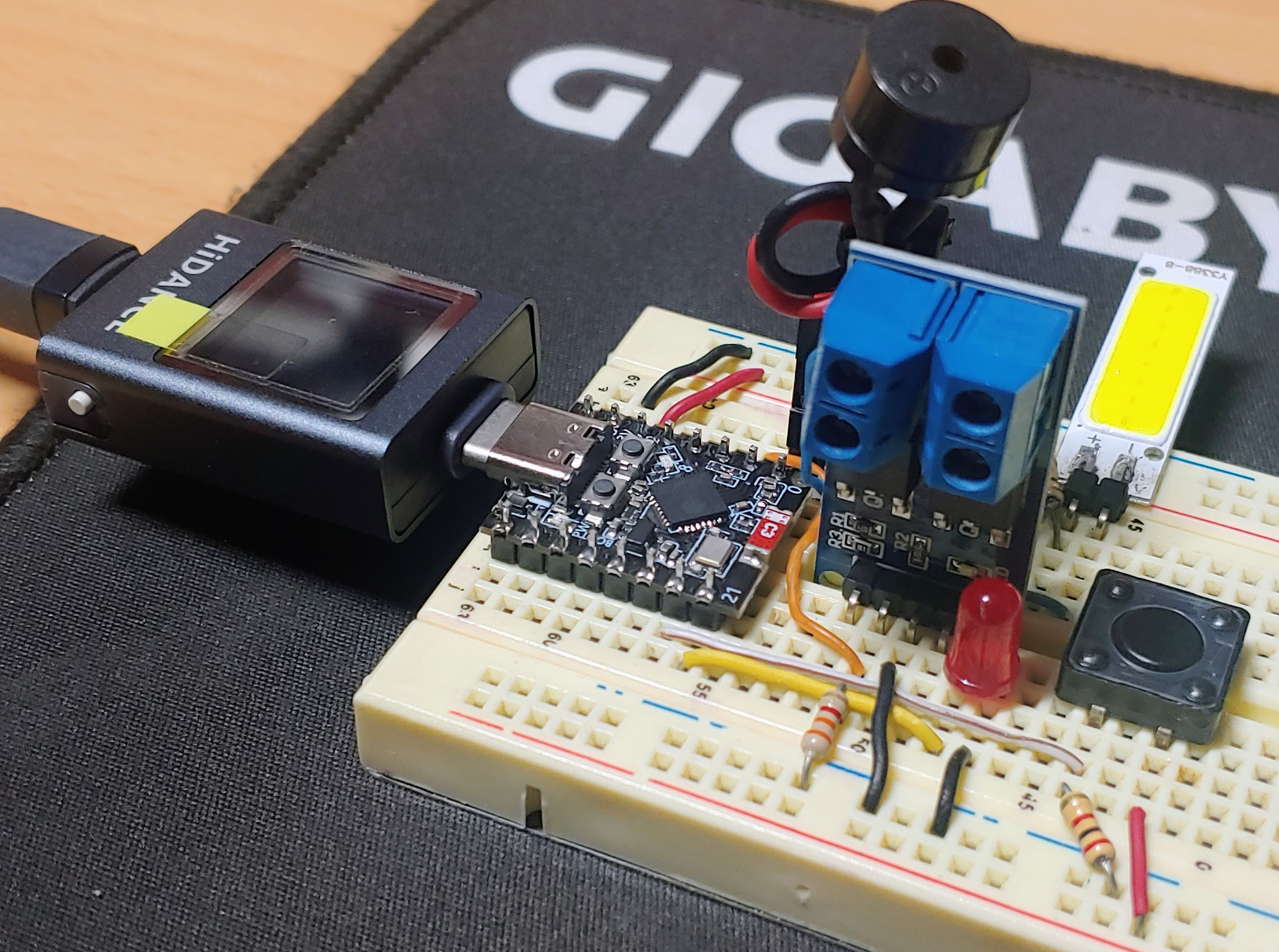
ESP32-C3 와 Android 앱 사이 Bluetooth 기반 MOSFET 으로 DC 전원을 제어합니다.
아래 사진 속 부하는 COB(Chip On Board) LED 입니다.
- 수동 ON/OFF 제어
- Bluetooth 장치 검색 / 등록 / 삭제
- 장치 원격 ON/OFF 제어
- 수동 ON/OFF 상태 Android 앱 동기화
- Bluetooth 온라인 LED (점멸: 연결 중, ON: 연결됨)
- 알림 부저음
* Flutter Dart 소스 코드
import 'dart:async';
import 'dart:convert';
import 'package:flutter/material.dart';
import 'package:flutter/services.dart';
import 'package:flutter_blue_plus/flutter_blue_plus.dart' as fb;
import 'package:permission_handler/permission_handler.dart';
import 'package:flutter_localizations/flutter_localizations.dart';
import 'dart:io';
// 장치 정보 클래스
class RegisteredDevice {
final String name;
final fb.BluetoothDevice device;
bool isConnected;
bool isOn;
fb.BluetoothCharacteristic? targetCharacteristic;
fb.BluetoothCharacteristic? receiveCharacteristic;
String? lastReceivedMessage;
StreamSubscription<List<int>>? messageSubscription;
RegisteredDevice({
required this.name,
required this.device,
this.isConnected = false,
this.isOn = false,
this.targetCharacteristic,
this.receiveCharacteristic,
this.lastReceivedMessage,
this.messageSubscription,
});
// 장치 정보 JSON 직렬화
Map<String, dynamic> toJson() => {
'name': name,
'remoteId': device.remoteId.str,
'isOn': isOn,
};
// JSON 데이터 장치 정보 역직렬화 및 객체 생성
factory RegisteredDevice.fromJson(Map<String, dynamic> json) {
return RegisteredDevice(
name: json['name'] as String,
device: fb.BluetoothDevice.fromId(json['remoteId'] as String),
isConnected: false,
isOn: json['isOn'] as bool,
);
}
}
class DeviceStorage {
static const String _fileName = 'registered_devices.json';
static Future<String> get _localPath async {
try {
return './'; // 임시 경로
} catch (e) {
print("Error getting local path: $e");
return '';
}
}
static Future<File> get _localFile async {
final path = await _localPath;
return File('$path$_fileName');
}
// 장치 목록 저장
static Future<void> saveDevices(List<RegisteredDevice> devices) async {
try {
final file = await _localFile;
final jsonList = devices.map((d) => d.toJson()).toList();
final jsonString = json.encode(jsonList);
await file.writeAsString(jsonString);
print("Devices saved successfully.");
} catch (e) {
print("Error saving devices: $e");
}
}
// 장치 목록 로드
static Future<List<RegisteredDevice>> loadDevices() async {
try {
final file = await _localFile;
if (!await file.exists()) {
return [];
}
final jsonString = await file.readAsString();
final jsonList = json.decode(jsonString) as List;
print("Devices loaded successfully.");
return jsonList
.map(
(json) => RegisteredDevice.fromJson(json as Map<String, dynamic>),
)
.toList();
} catch (e) {
print("Error loading devices: $e");
return [];
}
}
}
Future<void> main() async {
FlutterError.onError = (FlutterErrorDetails details) {
FlutterError.dumpErrorToConsole(details);
};
WidgetsFlutterBinding.ensureInitialized();
SystemChrome.setEnabledSystemUIMode(
SystemUiMode.manual,
overlays: SystemUiOverlay.values,
);
runApp(const BLEApp());
}
class BLEApp extends StatefulWidget {
const BLEApp({super.key});
@override
State<BLEApp> createState() => _BLEAppState();
}
class _BLEAppState extends State<BLEApp> {
int? _expandedIndex;
bool _isLoading = true;
final List<RegisteredDevice> _registeredDevices = [];
final targetServiceUuid = fb.Guid("12345678-1234-1234-1234-123456789abc");
// Write (송신)
final sendCharacteristicUuid = fb.Guid(
"abcd1234-1234-1234-1234-123456789abc",
);
// Notify (수신)
final receiveCharacteristicUuid = fb.Guid(
"efff5678-5678-5678-5678-56789abcdeff",
);
@override
void initState() {
super.initState();
// 권한 확인
_checkPermissions();
// 앱 시작 시 장치 목록 로드
_loadDevices();
// UI 세로 모드 고정
SystemChrome.setPreferredOrientations([
DeviceOrientation.portraitUp,
DeviceOrientation.portraitDown,
]);
}
Future<void> _loadDevices() async {
final loadedDevices = await DeviceStorage.loadDevices();
setState(() {
_registeredDevices.addAll(loadedDevices);
_isLoading = false;
});
}
// 장치 목록 변경 시 저장 함수 호출
void _saveDevices() {
DeviceStorage.saveDevices(_registeredDevices);
}
@override
void dispose() {
for (var regDevice in _registeredDevices) {
regDevice.messageSubscription?.cancel();
regDevice.device.disconnect();
}
super.dispose();
}
void _showErrorPopup(String message) {
if (mounted) {
ScaffoldMessenger.of(context).showSnackBar(
SnackBar(
content: Text(
message,
style: const TextStyle(
color: Colors.white,
fontWeight: FontWeight.bold,
),
),
backgroundColor: Colors.red[700],
duration: const Duration(seconds: 4),
behavior: SnackBarBehavior.floating,
shape: RoundedRectangleBorder(
borderRadius: BorderRadius.circular(10),
),
margin: const EdgeInsets.all(10),
),
);
}
}
void _removeDevice(RegisteredDevice deviceToRemove) async {
deviceToRemove.messageSubscription?.cancel();
try {
if (deviceToRemove.isConnected ||
await deviceToRemove.device.isConnected) {
await deviceToRemove.device.disconnect();
}
} catch (e) {
print('Error disconnecting device before removal: $e');
}
setState(() {
_registeredDevices.removeWhere(
(device) => device.device.remoteId == deviceToRemove.device.remoteId,
);
});
// 장치 제거 후 저장
_saveDevices();
print('Device removed: ${deviceToRemove.name}');
}
// 권한 및 위치 서비스 체크 로직 강화
Future<void> _checkPermissions() async {
// 앱 권한 요청 (위치 포함)
final Map<Permission, PermissionStatus> statuses = await [
Permission.bluetooth,
Permission.bluetoothScan,
Permission.bluetoothConnect,
Permission.bluetoothAdvertise,
Permission.location,
].request();
// 2. 위치 권한 상태 확인 및 오류 알림
final isLocationGranted = statuses[Permission.location]?.isGranted ?? false;
if (!isLocationGranted) {
_showErrorPopup("BLE 스캔을 위해 위치 권한(Location)이 필요합니다. 앱 설정을 확인해주세요.");
// 권한이 없으면 다음 단계를 진행하지 않고 리턴
return;
}
// 장치의 위치 서비스(GPS) 상태 확인
ServiceStatus locationServiceStatus =
await Permission.location.serviceStatus;
bool isLocationOn = locationServiceStatus.isEnabled;
if (!isLocationOn) {
_showErrorPopup("BLE 기능을 사용하려면 기기 설정에서 '위치 서비스(GPS)'를 켜주세요.");
}
// Bluetooth 어댑터(블루투스 ON/OFF 스위치) 상태 확인
if (await fb.FlutterBluePlus.isSupported) {
final adapterState = await fb.FlutterBluePlus.adapterState.first;
if (adapterState != fb.BluetoothAdapterState.on) {
_showErrorPopup(
"BLE 기능을 사용하려면 기기 설정에서 'Bluetooth'를 켜주세요. (현재 상태: ${adapterState.toString().split('.').last})",
);
}
}
}
Future<void> _setupNotification(
RegisteredDevice regDevice,
fb.BluetoothCharacteristic characteristic,
) async {
regDevice.messageSubscription?.cancel();
regDevice.messageSubscription = null;
regDevice.receiveCharacteristic = null;
if (characteristic.properties.notify) {
await characteristic.setNotifyValue(true);
print('Notification set to true for ${regDevice.name}');
regDevice.messageSubscription = characteristic.lastValueStream.listen(
(value) {
if (value.isNotEmpty) {
final receivedData = utf8.decode(value);
print('Received message from ${regDevice.name}: $receivedData');
try {
final jsonMap = json.decode(receivedData);
if (jsonMap is Map<String, dynamic> &&
jsonMap['status'] == 'relay_update') {
final relayState = jsonMap['payload']['relay'];
if (relayState == 'on' || relayState == 'off') {
final newSwitchState = (relayState == 'on');
if (regDevice.isOn != newSwitchState) {
if (mounted) {
setState(() {
regDevice.isOn = newSwitchState;
regDevice.lastReceivedMessage = receivedData;
});
_saveDevices();
print(
'Switch state updated by Notification for ${regDevice.name}: $relayState',
);
}
}
}
}
} catch (e) {
print('Error parsing received JSON for ${regDevice.name}: $e');
}
}
},
onError: (e) {
print('Error in message stream for ${regDevice.name}: $e');
},
onDone: () {
print('Message stream closed for ${regDevice.name}');
regDevice.messageSubscription = null;
},
);
regDevice.receiveCharacteristic = characteristic;
} else {
print(
'Characteristic ${characteristic.uuid} does not support Notification.',
);
}
}
Future<void> _discoverAndSetupServices(RegisteredDevice regDevice) async {
List<fb.BluetoothService> services = await regDevice.device
.discoverServices();
var targetService = services.firstWhere(
(s) => s.uuid == targetServiceUuid,
orElse: () =>
throw Exception("Target service UUID not found: $targetServiceUuid"),
);
regDevice.targetCharacteristic = targetService.characteristics.firstWhere(
(c) => c.uuid == sendCharacteristicUuid,
orElse: () => throw Exception(
"Target send characteristic UUID not found: $sendCharacteristicUuid",
),
);
try {
var receiveCharacteristic = targetService.characteristics.firstWhere(
(c) => c.uuid == receiveCharacteristicUuid,
orElse: () => throw Exception(
"Target receive characteristic UUID not found: $receiveCharacteristicUuid",
),
);
await _setupNotification(regDevice, receiveCharacteristic);
} catch (e) {
print('Warning: Receive characteristic setup failed: $e');
}
}
Future<void> _requestInitialState(RegisteredDevice regDevice) async {
if (regDevice.targetCharacteristic != null &&
regDevice.targetCharacteristic!.properties.write) {
const statusRequestData = {"cmd": "status_request", "payload": {}};
final jsonString = json.encode(statusRequestData);
try {
await regDevice.targetCharacteristic!.write(
utf8.encode(jsonString),
withoutResponse: false,
);
print('Initial status request sent to ${regDevice.name}: $jsonString');
} catch (e) {
print('Initial status request failed for ${regDevice.name}: $e');
_showErrorPopup('${regDevice.name}: 초기 상태 요청 전송 실패.');
}
} else {
print(
'Error: Target characteristic not available for initial status request.',
);
}
}
Future<void> _registerAndSendData(
String name,
fb.BluetoothDevice device,
) async {
final newRegDevice = RegisteredDevice(name: name, device: device);
setState(() {
if (!_registeredDevices.any(
(d) => d.device.remoteId == device.remoteId,
)) {
_registeredDevices.add(newRegDevice);
}
});
const wifiData = {
"cmd": "init",
"payload": {"ssid": "jih", "pwd": "1234"},
};
final jsonString = json.encode(wifiData);
try {
await device.connect(
license: fb.License.free,
autoConnect: false,
timeout: const Duration(seconds: 10),
);
setState(() {
newRegDevice.isConnected = true;
});
await _discoverAndSetupServices(newRegDevice);
// Wi-Fi 설정 데이터 전송
await newRegDevice.targetCharacteristic!.write(
utf8.encode(jsonString),
withoutResponse: false,
);
print('Wi-Fi config sent to ${newRegDevice.name}: $jsonString');
// 등록 후 초기 상태 요청
await _requestInitialState(newRegDevice);
// 등록 성공 후 장치 목록 저장
_saveDevices();
} catch (e) {
final errorMsg =
'등록 및 연결 실패: ${newRegDevice.name} 장치에 연결하거나 데이터를 전송할 수 없습니다. (${e.toString().split(':')[0]})';
print('Registration and Send Error for ${newRegDevice.name}: $e');
_showErrorPopup(errorMsg);
if (mounted) {
setState(() {
newRegDevice.isConnected = false;
});
}
}
}
Future<void> _connect(RegisteredDevice regDevice) async {
// 연결 해제 로직
if (regDevice.isConnected) {
regDevice.messageSubscription?.cancel();
regDevice.messageSubscription = null;
regDevice.receiveCharacteristic = null;
try {
await regDevice.device.disconnect();
} catch (e) {
print('Error disconnecting during reconnect: $e');
}
setState(() {
regDevice.isConnected = false;
regDevice.targetCharacteristic = null;
regDevice.isOn = false;
});
return;
}
// 연결 시도 로직
try {
await regDevice.device.connect(
license: fb.License.free,
autoConnect: false,
timeout: const Duration(seconds: 10),
);
setState(() {
regDevice.isConnected = true;
});
// 서비스 발견 및 특성 찾기
await _discoverAndSetupServices(regDevice);
// 연결 후 초기 상태 요청
await _requestInitialState(regDevice);
} catch (e) {
print('Connection Error for ${regDevice.name}: $e');
_showErrorPopup('${regDevice.name} 연결 실패. GATT 캐시 정리 후 재시도 중...');
// 연결 실패 시 GATT 캐시를 삭제하고 재연결을 시도합니다.
try {
print('Attempting to clear GATT cache for ${regDevice.name}...');
await regDevice.device.clearGattCache();
print('GATT cache cleared. Trying reconnect ONE MORE TIME...');
// **재연결 시도** (최대 1회)
await regDevice.device.connect(
license: fb.License.free,
autoConnect: false,
timeout: const Duration(seconds: 10),
);
setState(() {
regDevice.isConnected = true;
});
// 재연결 성공 후 서비스 다시 발견
await _discoverAndSetupServices(regDevice);
// 재연결 후 초기 상태 요청
await _requestInitialState(regDevice);
} catch (reconnectError) {
final finalErrorMsg =
'최종 연결 실패: ${regDevice.name} (${reconnectError.toString().split(':')[0]}). 장치 전원을 확인하세요.';
print('Reconnection failed after GATT cache clear: $reconnectError');
_showErrorPopup(finalErrorMsg);
// 연결 실패 상태 UI 반영
if (mounted) {
setState(() {
regDevice.isConnected = false;
regDevice.isOn = false;
regDevice.targetCharacteristic = null;
regDevice.receiveCharacteristic = null;
});
}
}
}
}
void _toggleDeviceState(RegisteredDevice regDevice, bool value) async {
// Switch가 즉시 움직이도록 UI 상태 먼저 업데이트
if (mounted) {
setState(() {
regDevice.isOn = value;
});
// 상태 변경 시 저장
_saveDevices();
}
if (regDevice.targetCharacteristic != null &&
regDevice.targetCharacteristic!.properties.write) {
final data = {
"cmd": "control",
"payload": {"relay": value ? "on" : "off"},
};
final jsonString = json.encode(data);
try {
// BLE 통신 시도
await regDevice.targetCharacteristic!.write(
utf8.encode(jsonString),
withoutResponse: false,
);
print('Command sent to ${regDevice.name}: $jsonString');
} catch (e) {
print('Data Send Error for ${regDevice.name}: $e');
// 통신 실패 시 UI 상태 롤백 및 오류 팝업
if (mounted) {
setState(() {
regDevice.isOn = !value; // 상태 롤백
});
_saveDevices();
_showErrorPopup('데이터 전송 실패: ${regDevice.name} 장치와의 연결을 확인하세요.');
}
}
} else {
print(
'Error: Target characteristic not available for writing or not connected.',
);
// 통신 불가 시 UI 상태 롤백 및 오류 팝업
if (mounted) {
setState(() {
regDevice.isOn = !value;
});
_saveDevices();
_showErrorPopup('오류: 장치가 연결되지 않았거나 특성을 찾을 수 없습니다.');
}
}
}
void _showScanModal(BuildContext context) {
showModalBottomSheet(
context: context,
isScrollControlled: true,
builder: (BuildContext modalContext) {
return const ScanDeviceModal();
},
).then((result) {
if (result != null && result is Map<String, dynamic>) {
_registerAndSendData(
result['name'] as String,
result['device'] as fb.BluetoothDevice,
);
}
});
}
@override
Widget build(BuildContext context) {
return MaterialApp(
debugShowCheckedModeBanner: false,
title: '장치 관리자',
localizationsDelegates: const [
GlobalMaterialLocalizations.delegate,
GlobalWidgetsLocalizations.delegate,
],
supportedLocales: const [Locale('ko', 'KR')],
home: Scaffold(
appBar: AppBar(
backgroundColor: Theme.of(context).primaryColor,
leading: const Icon(Icons.settings, color: Colors.white),
titleSpacing: 0,
title: const Text('장치 관리자'),
titleTextStyle: const TextStyle(color: Colors.white, fontSize: 20),
actions: [
Builder(
builder: (innerContext) => IconButton(
icon: const Icon(Icons.search, color: Colors.white),
onPressed: () => _showScanModal(innerContext),
),
),
],
),
body: _isLoading
? const Center(child: CircularProgressIndicator())
: ListView.builder(
itemCount: _registeredDevices.length,
itemBuilder: (context, index) {
final regDevice = _registeredDevices[index];
return Column(
children: [
ListTile(
contentPadding: const EdgeInsets.only(
left: 16.0,
right: 0.0,
),
title: Text(regDevice.name), // 등록된 이름
subtitle: Text(
'${regDevice.device.remoteId.toString()}${regDevice.isConnected ? ' (연결됨)' : ''}',
style: TextStyle(
color: regDevice.isConnected
? Colors.green
: Colors.grey,
),
),
trailing: IconButton(
icon: Icon(
regDevice.isConnected ? Icons.link_off : Icons.link,
color: regDevice.isConnected
? Colors.green
: Colors.grey,
size: 25,
),
onPressed: () => _connect(regDevice),
),
onTap: () {
setState(() {
_expandedIndex = _expandedIndex == index
? null
: index;
});
},
),
AnimatedSize(
duration: const Duration(milliseconds: 300),
curve: Curves.easeInOut,
child: index == _expandedIndex
? Padding(
padding: const EdgeInsets.symmetric(
horizontal: 16.0,
vertical: 8.0,
),
child: Row(
mainAxisAlignment:
MainAxisAlignment.spaceBetween,
children: [
IconButton(
onPressed: () {
_expandedIndex = null;
_removeDevice(regDevice);
},
icon: const Icon(
Icons.delete_forever,
color: Colors.red,
size: 30,
),
),
Row(
children: [
const Text(
'스위치',
style: TextStyle(fontSize: 18),
),
Switch(
value: regDevice.isOn,
padding: const EdgeInsets.fromLTRB(
0,
0,
20,
0,
),
onChanged: (value) =>
_toggleDeviceState(
regDevice,
value,
),
),
],
),
],
),
)
: const SizedBox.shrink(),
),
const Divider(height: 1),
],
);
},
),
),
);
}
}
// 목록 (장치 검색)을 위한 모달 팝업 위젯
class ScanDeviceModal extends StatefulWidget {
const ScanDeviceModal({super.key});
@override
State<ScanDeviceModal> createState() => _ScanDeviceModalState();
}
class _ScanDeviceModalState extends State<ScanDeviceModal> {
final Set<fb.BluetoothDevice> _scanResultsSet = {};
fb.BluetoothDevice? _selectedDevice;
final TextEditingController _nameController = TextEditingController();
late StreamSubscription<List<fb.ScanResult>> _scanSubscription;
@override
void initState() {
super.initState();
_startScan();
}
@override
void dispose() {
_scanSubscription.cancel();
if (fb.FlutterBluePlus.isScanningNow) {
fb.FlutterBluePlus.stopScan();
}
_nameController.dispose();
super.dispose();
}
Future<void> _startScan() async {
if (await fb.FlutterBluePlus.adapterState.first !=
fb.BluetoothAdapterState.on) {
try {
await fb.FlutterBluePlus.turnOn();
await fb.FlutterBluePlus.adapterState.firstWhere(
(s) => s == fb.BluetoothAdapterState.on,
);
} catch (e) {
print('Failed to turn on Bluetooth: $e');
if (mounted) {
Navigator.of(context).pop();
}
return;
}
}
_scanResultsSet.clear();
setState(() {});
if (fb.FlutterBluePlus.isScanningNow) {
await fb.FlutterBluePlus.stopScan();
}
_scanSubscription = fb.FlutterBluePlus.scanResults.listen((results) {
for (fb.ScanResult r in results) {
final deviceName = r.device.platformName;
if (deviceName.toLowerCase().startsWith('dev-')) {
if (_scanResultsSet.add(r.device)) {
setState(() {});
}
}
}
}, onError: (e) => print('Scan Error: $e'));
await fb.FlutterBluePlus.startScan(timeout: const Duration(seconds: 5));
}
@override
Widget build(BuildContext context) {
final scannedDevicesList = _scanResultsSet.toList();
final mediaQuery = MediaQuery.of(context);
// 키보드가 나타날 때, 키보드의 높이(viewInsets.bottom)만큼 하단 패딩을 추가하여 모달 내용을 밀어 올립니다.
return Padding(
padding: EdgeInsets.only(bottom: mediaQuery.viewInsets.bottom),
child: Container(
height: mediaQuery.size.height * 0.7,
padding: const EdgeInsets.all(16.0),
child: Column(
children: [
const Text(
'장치 검색',
style: TextStyle(fontSize: 18, fontWeight: FontWeight.bold),
),
const SizedBox(height: 10),
StreamBuilder<bool>(
stream: fb.FlutterBluePlus.isScanning,
initialData: false,
builder: (context, snapshot) {
final isScanning = snapshot.data ?? false;
return Row(
mainAxisAlignment: MainAxisAlignment.spaceBetween,
children: [
Text(isScanning ? '검색 중...' : '검색 완료'),
IconButton(
icon: Icon(isScanning ? Icons.stop : Icons.refresh),
onPressed: isScanning
? fb.FlutterBluePlus.stopScan
: _startScan,
),
],
);
},
),
Expanded(
child: ListView.builder(
itemCount: scannedDevicesList.length,
itemBuilder: (context, index) {
final d = scannedDevicesList[index];
final isSelected = _selectedDevice == d;
return ListTile(
title: Text(
d.platformName.isNotEmpty
? d.platformName
: '(알 수 없는 장치)',
),
subtitle: Text(d.remoteId.toString()),
trailing: isSelected
? const Icon(Icons.check_circle, color: Colors.green)
: null,
onTap: () {
setState(() {
_selectedDevice = d;
_nameController.text = d.platformName.isNotEmpty
? d.platformName
: '새 장치';
});
},
);
},
),
),
if (_selectedDevice != null) ...[
const Divider(),
TextField(
controller: _nameController,
decoration: const InputDecoration(
labelText: '등록 이름',
border: OutlineInputBorder(),
),
),
const SizedBox(height: 10),
Row(
mainAxisAlignment: MainAxisAlignment.end,
children: [
TextButton(
onPressed: () {
Navigator.of(context).pop();
},
child: const Text('취소'),
),
const SizedBox(width: 10),
ElevatedButton(
onPressed: _nameController.text.trim().isNotEmpty
? () {
Navigator.of(context).pop({
'name': _nameController.text.trim(),
'device': _selectedDevice!,
});
}
: null,
child: const Text('등록'),
),
],
),
],
],
),
),
);
}
}
* ESP32-C3 소스 코드 (Arduino IDE)
#include <BLEDevice.h>
#include <BLEServer.h>
#include <BLEUtils.h>
#include <BLE2902.h>
#include <ArduinoJson.h>

const int BUZZER_PIN = 0;
const int MOSFET_CONTROL_PIN = 1;
const int SWITCH_INPUT_PIN = 20;
const int STATUS_LED_PIN = 21;

bool ledState = LOW;
bool mosfetState = LOW;
bool pressButton = false;
unsigned long lastLedOnTime;
unsigned long pressStartTime;

// BLE UUID 정의 (Flutter 앱과 일치해야 함)
#define SERVICE_UUID       "12345678-1234-1234-1234-123456789abc"
#define WRITE_CHAR_UUID    "abcd1234-1234-1234-1234-123456789abc"
#define NOTIFY_CHAR_UUID   "efff5678-5678-5678-5678-56789abcdeff"

// BLE 전역 변수
BLEService *pService = nullptr;
BLEServer* pServer = nullptr;
BLEAdvertising *pAdvertising = nullptr;
BLECharacteristic* pWriteCharacteristic = nullptr;
BLECharacteristic* pNotifyCharacteristic = nullptr;
bool deviceRegistered = false;
unsigned long registerStartTime = 0;

// Wi-Fi 정보를 저장할 버퍼
char ssidBuffer[32];
char pwdBuffer[64];

const size_t JSON_DOC_SIZE = 256;

void buzzer(unsigned int frequency, unsigned long duration = 0) {
  tone(BUZZER_PIN, frequency, duration);
  if (duration > 0) {
    delay(duration);
    noTone(BUZZER_PIN);
  }
}

void sendMosfetStateNotification(bool state) {
  // 연결된 클라이언트가 없거나 특성이 설정되지 않았으면 전송하지 않음
  if (!pServer || pServer->getConnectedCount() == 0 || !pNotifyCharacteristic) {
    Serial.println("Notification skipped: No BLE client connected or characteristic unavailable.");
    return;
  }

  // JSON 문서 구성
  StaticJsonDocument<JSON_DOC_SIZE> doc;
  doc["status"] = "relay_update";
  doc["payload"]["relay"] = state ? "on" : "off";

  char jsonBuffer[JSON_DOC_SIZE];
  serializeJson(doc, jsonBuffer);

  // BLE 특성 값 설정 및 알림 전송
  pNotifyCharacteristic->setValue(jsonBuffer);
  pNotifyCharacteristic->notify();
  Serial.printf("Sent Notification: %s\n", jsonBuffer);
}

// BLE 연결/해제 이벤트를 처리하는 콜백 클래스
class MyServerCallbacks: public BLEServerCallbacks {
    void onConnect(BLEServer* pServer) {
        Serial.println("Client connected.");

        delay(100);
        sendMosfetStateNotification(mosfetState);
        Serial.println("Sent initial relay state notification.");

        if (deviceRegistered && registerStartTime > 0) {
          // 등록 성공 시 타임아웃 로직 중지
          registerStartTime = 0;
          ledState = HIGH;
          digitalWrite(STATUS_LED_PIN, ledState);
        }
    }

    void onDisconnect(BLEServer* pServer) {
        Serial.println("Client disconnected. Starting advertising again...");
        // 클라이언트가 연결을 해제하면, 장치는 다시 광고를 시작해야 합니다.
        if (deviceRegistered) {
            ledState = LOW;
            digitalWrite(STATUS_LED_PIN, ledState);
            // 등록이 완료된 상태라면, 자동으로 광고를 재시작합니다.
            pAdvertising->start();
            Serial.println("Advertising resumed.");
        } else {
            // 등록 모드였다면, loop()의 타임아웃 로직이 광고 중지를 처리할 수 있도록 둡니다.
            if (registerStartTime > 0) {
                pAdvertising->start();
                Serial.println("Advertising resumed in registration mode.");
            }
        }
    }
};

class BLECallbacks: public BLECharacteristicCallbacks {
  void onWrite(BLECharacteristic *pChar) {
    String rxValue = String(pChar->getValue().c_str());

    Serial.printf("Received Data(%d): %s\n", rxValue.length(), rxValue.c_str());

    if (rxValue.length() == 0) {
      return;
    }

    // JSON 문서 생성 및 파싱
    StaticJsonDocument<JSON_DOC_SIZE> doc;
    DeserializationError error = deserializeJson(doc, rxValue);

    if (error) {
        Serial.printf("JSON parse failed: %s (Data: %s)\n", error.c_str(), rxValue.c_str());
        return;
    }

    if (doc.containsKey("cmd")) {
      const char* command = doc["cmd"];

      if (strcmp(command, "init") == 0) {
        if (!deviceRegistered) {
          const char* receivedSsid = doc["payload"]["ssid"];
          const char* receivedPwd = doc["payload"]["pwd"];

          strncpy(ssidBuffer, receivedSsid, sizeof(ssidBuffer) - 1);
          ssidBuffer[sizeof(ssidBuffer) - 1] = '\0';
          strncpy(pwdBuffer, receivedPwd, sizeof(pwdBuffer) - 1);
          pwdBuffer[sizeof(pwdBuffer) - 1] = '\0';

          deviceRegistered = true;
          registerStartTime = 0; // 등록 성공 시 타임아웃 로직 중지
          ledState = HIGH;
          digitalWrite(STATUS_LED_PIN, ledState);

          // 등록 성공 시 광고 중지 (앱이 연결을 끊지 않은 경우를 대비)
          if (pAdvertising->isAdvertising()) {
              pAdvertising->stop();
              Serial.println("Advertising stopped after successful registration.");
          }

          Serial.println("Registration successful");
        }
      } else if (strcmp(command, "control") == 0) {
        const char* relay = doc["payload"]["relay"];
        if (strcmp(relay, "on") == 0) {
          mosfetState = HIGH;
        } else if (strcmp(relay, "off") == 0) {
          mosfetState = LOW;
        }
        digitalWrite(MOSFET_CONTROL_PIN, mosfetState);
        Serial.printf("Relay %s (BLE controlled)\n", mosfetState == HIGH ? "ON" : "OFF");
        buzzer(1000, 100);

        // 상태 변경 알림 전송 (앱이 명령을 보냈으므로 확인용)
        sendMosfetStateNotification(mosfetState);

      } else if (strcmp(command, "status_request") == 0) {
        // 릴레이 상태 요청 명령 수신 시, 현재 상태를 Notification으로 전송
        Serial.println("Status request received. Sending current state.");
        sendMosfetStateNotification(mosfetState);
      }
    }
  }
};

void setup() {
  Serial.begin(9600);

  // 핀 모드 설정
  pinMode(BUZZER_PIN, OUTPUT);
  pinMode(MOSFET_CONTROL_PIN, OUTPUT);
  pinMode(SWITCH_INPUT_PIN, INPUT_PULLDOWN);
  pinMode(STATUS_LED_PIN, OUTPUT);

  // MOSFET OFF 초기 설정
  digitalWrite(MOSFET_CONTROL_PIN, mosfetState);

  // BLE 초기화
  BLEDevice::init("dev-ESP32C3");
  pServer = BLEDevice::createServer();

  // 서버에 연결/해제 콜백 등록
  pServer->setCallbacks(new MyServerCallbacks());

  pService = pServer->createService(SERVICE_UUID);

  // 1. Write/Read/Write_NR 특성 설정 (명령 수신용)
  pWriteCharacteristic = pService->createCharacteristic(
    WRITE_CHAR_UUID,
    BLECharacteristic::PROPERTY_READ |
    BLECharacteristic::PROPERTY_WRITE |
    BLECharacteristic::PROPERTY_WRITE_NR
  );
  pWriteCharacteristic->setCallbacks(new BLECallbacks());
  pWriteCharacteristic->setValue("Device READY");

  // Notify 특성 설정 (상태 전송용)
  pNotifyCharacteristic = pService->createCharacteristic(
    NOTIFY_CHAR_UUID,
    BLECharacteristic::PROPERTY_NOTIFY
  );
  // 클라이언트가 알림을 구독할 수 있도록 DESCRIPTOR 추가
  pNotifyCharacteristic->addDescriptor(new BLE2902());
  pNotifyCharacteristic->setValue("Status initialized");

  pAdvertising = BLEDevice::getAdvertising();
  pAdvertising->addServiceUUID(pService->getUUID());

  // 초기 부팅 완료 알림 LED
  digitalWrite(STATUS_LED_PIN, HIGH);
  delay(100);
  digitalWrite(STATUS_LED_PIN, LOW);

  // 장치가 등록된 상태가 아니므로, 광고는 loop()의 스위치 로직을 따릅니다.
  Serial.println("Device awaiting registration via button press.");
}

void loop() {
  // 등록 완료. 연결된 클라이언트가 없을 때만 광고가 실행되도록 관리.
  if (deviceRegistered && pServer->getConnectedCount() == 0 && !pAdvertising->isAdvertising()) {
      pAdvertising->start();
      Serial.println("Device registered and ready to connect (Advertising).");
      // 등록 후 LED ON
      digitalWrite(STATUS_LED_PIN, HIGH);
  }

  // 등록 모드 (버튼 1초 이상 누름) 시 LED 점멸 및 타임아웃 처리
  if (registerStartTime > 0) {
    if (millis() - registerStartTime > 60000) {
      ledState = LOW;
      digitalWrite(STATUS_LED_PIN, ledState);
      registerStartTime = 0;
      pressButton = false;

      if (!deviceRegistered) {
        // 타임아웃 시 광고 중지
        pAdvertising->stop();
        pService->stop();
      }

      Serial.println("Registration timeout");
    } else if (lastLedOnTime == 0 || millis() - lastLedOnTime > 100) {
      ledState = !ledState;
      digitalWrite(STATUS_LED_PIN, ledState);
      lastLedOnTime = millis();
    }
  }

  // 스위치 입력 처리
  if (!pressButton && digitalRead(SWITCH_INPUT_PIN) == HIGH) {
    pressButton = true;
    pressStartTime = millis();

    // 1초 이상 Down 확인 (등록 모드 진입)
    while (digitalRead(SWITCH_INPUT_PIN) == HIGH && registerStartTime == 0) {
      if (millis() - pressStartTime >= 1000) {
        pService->start();
        // 등록 모드 진입 시 광고 시작
        if (!pAdvertising->isAdvertising()) {
            pAdvertising->start();
        }

        registerStartTime = millis();
        lastLedOnTime = 0;

        Serial.println("Start registration");
      }
    }
  } else if (pressButton && digitalRead(SWITCH_INPUT_PIN) == LOW) {
    pressButton = false;

    // 1초 미만 누름 (일반 토글)
    if (millis() - pressStartTime < 1000) {
      // MOSFET ON/OFF 토글
      mosfetState = !mosfetState;
      digitalWrite(MOSFET_CONTROL_PIN, mosfetState);
      Serial.printf("Relay %s (Manual controlled)\n", mosfetState == HIGH ? "on" : "off");
      buzzer(1000, 100);

      // MOSFET 상태 변경 전송 (수동 조작 시 앱 동기화)
      sendMosfetStateNotification(mosfetState);
    }
  }
}'DIY' 카테고리의 다른 글
| ESP32-C3 + PCM5102(I2S) + GStreamer ⇒ Audio Streaming #1 (0) | 2025.10.19 |
|---|---|
| [H/W] 전동 공구 배터리 팩 전압 표시 개선 (0) | 2025.10.16 |
| [F/W, H/W] SBC 소비 전력 최적화: SBC + PIC 에너지 절감 (0) | 2025.10.04 |
| [S/W] NetworkMonitor : 네트워크 패킷 모니터링 툴 (0) | 2025.09.22 |
| [H/W] USB 배터리 뱅크 (0) | 2025.09.20 |