
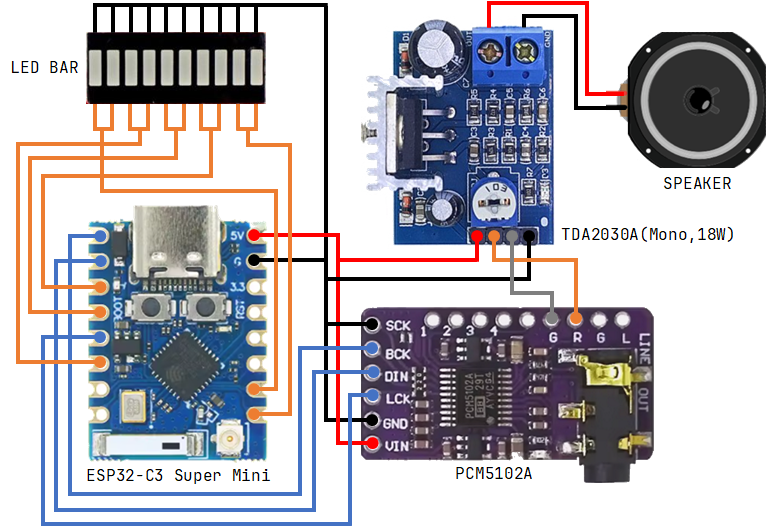
ESP32-C3 기반 무선(WiFi) 스피커 프로토타이핑을 시작했습니다.
우선 목표는 LTE 모뎀 연동은 불가하니 Bluetooth, WiFi 기반 무선 스피커 시스템입니다.
DAC 는 PCM5102A 를 사용했고 I2S 프로토콜로 연결됩니다.
오디오 코덱은 OPUS 으로 인코딩하고 대역폭은 mediumband 인데, wideband, fullband 큰 차이가 느껴지지 않습니다.
고음질이 필요한 시스템도 아니고 데이터 크기가 커져서 스트리밍 품질이 많이 저하됩니다.
스트리밍 서버는 PC(Windows) 에서 GStreamer 를 사용했습니다.
음원은 Microsoft Edge TTS를 이용하여 텍스트로 생성했습니다.
간단하게 그래픽 이퀄라이저도 구현했는데 마음에 들지는 않네요.
gst-launch-1.0 filesrc location=d:/temp/sample5.mp3 ! decodebin ! queue ! audioconvert ! volume volume=0.1 ! audioresample ! opusenc inband-fec=true frame-size=20 bandwidth="mediumband" ! rtpopuspay pt=96 ! udpsink host=192.168.219.101 port=5004#include <ESP_I2S.h>
#include <opus.h>
#include <WiFi.h>
#include <WiFiUdp.h>
#include <freertos/FreeRTOS.h>
#include <freertos/task.h>
#include <freertos/queue.h>
#include <math.h>
// I2S 핀 설정 (DAC/AMP 연결) - GPIO 5, 6, 9
#define I2S_BCLK 5 // CLOCK : I2S 클럭 (BCLK)
#define I2S_DIN 6 // Serial Data In : I2S 오디오 데이터 입력
#define I2S_LRC 9 // Word Select : 좌/우 채널 선택 (LRCK)
// LED GPIO 핀 설정 (5-밴드 이퀄라이저)
const int LED_PINS[] = {0, 1, 7, 8, 10}; // Bass, Low-Mid, Mid, High-Mid, Treble
const int NUM_LEDS = 5;
// Opus 표준 샘플 레이트
const int sampleRate = 48000;
#define PI 3.14159265358979323846
// ---------- WiFi 설정 ----------
const char* ssid = "******";
const char* password = "******";
// ---------- RTP 수신 설정 ----------
WiFiUDP udp;
const uint16_t RTP_PORT = 5004;
// ---------- OPUS 설정 ----------
#define MAX_PACKET_SIZE 1500
OpusDecoder* opusDecoder;
const int channels = 2; // stereo
// 20ms 프레임(960 샘플) 유지
const int frameSize = 960;
int16_t pcmBuffer[frameSize * channels];
// ---------- FreeRTOS Queue 설정 ----------
#define QUEUE_SIZE 30
#define STARTUP_FILL_LEVEL 10
struct OpusPacket {
uint8_t data[MAX_PACKET_SIZE - 12];
int len;
};
QueueHandle_t opusQueue;
TaskHandle_t audioTaskHandle = NULL;
void audio_task(void *param);
i2s_data_bit_width_t bps = I2S_DATA_BIT_WIDTH_16BIT;
i2s_mode_t mode = I2S_MODE_STD;
i2s_slot_mode_t slot = I2S_SLOT_MODE_STEREO;
I2SClass i2s;
// ---------- EQ 필터 및 상태 변수 ----------
// CPU 부하를 줄이기 위한 간단한 저역 통과 필터 (EMA)
float bass_lp_ema = 0.0f;
float mid_lp_ema = 0.0f; // 중간 주파수 분리를 위해 추가
// LED의 피크 레벨을 추적하는 변수 (잔상 효과)
float visual_decay[NUM_LEDS] = {0.0f};
// Low-Pass 필터 상수 (Bass) - 느린 반응
const float BASS_ALPHA = 0.05f;
// Mid-Pass 필터 상수 - 중간 반응
const float MID_ALPHA = 0.15f;
// Decay 상수 (LED 밝기 감소 속도) - 잔상을 늘림
const float DECAY_ALPHA = 0.5f;
// 게인 조절 (감도) - 10배 상향 조정하여 LED 반응성 극대화
const float GAIN_FACTOR = 0.000005f;
// 디지털 출력 임계값 (0.0 ~ 1.0 스케일): 값이 크면 더 강한 소리에만 반응
const float DIGITAL_THRESHOLD = 0.2f;
/
* @brief PCM 데이터의 RMS(제곱 평균 제곱근) 에너지 계산
* @param pcm PCM 데이터 버퍼 (int16_t)
* @param num_samples 샘플 수 (스테레오이므로 채널 수 * 프레임 사이즈)
* @return 에너지 값 (float)
*/
float calculate_energy(int16_t* pcm, int num_samples) {
long long sum_sq = 0;
for (int i = 0; i < num_samples; i++) {
sum_sq += (long long)pcm[i] * pcm[i];
}
// RMS 대신 Sum of Squares를 사용, 에너지에 비례
return (float)sum_sq / num_samples;
}
/
* @brief 오디오 에너지에 따라 5개 LED의 밝기 업데이트. (디지털 On/Off 방식)
* @param pcm 디코딩된 PCM 데이터 버퍼
* @param frame_len 디코딩된 샘플 수 (960)
*/
void update_equalizer_leds(int16_t* pcm, int frame_len) {
// 현재 프레임의 총 에너지 계산 (스테레오이므로 2 * frame_len)
float current_energy = calculate_energy(pcm, frame_len * channels);
// EMA 필터 업데이트
// Bass (저역 통과) EMA 업데이트 (느림)
bass_lp_ema = bass_lp_ema * (1.0f - BASS_ALPHA) + current_energy * BASS_ALPHA;
// Mid (중역 통과) EMA 업데이트 (중간 속도)
mid_lp_ema = mid_lp_ema * (1.0f - MID_ALPHA) + current_energy * MID_ALPHA;
// 각 밴드에 에너지 할당 (차분 기반 주파수 분리)
float bands[NUM_LEDS];
// Band 0: Bass (느린 EMA 자체)
bands[0] = bass_lp_ema * 1.5f;
// Band 1: Low-Mid (중간 EMA - 느린 EMA)
bands[1] = (mid_lp_ema - bass_lp_ema) * 3.0f;
if (bands[1] < 0) bands[1] = 0;
// Band 2, 3, 4: Mid, High-Mid, Treble (총 에너지 - 중간 EMA = 잔여 고주파 에너지)
float remaining_high_energy = current_energy - mid_lp_ema;
if (remaining_high_energy < 0) remaining_high_energy = 0;
// 잔여 에너지를 Mid-High 밴드에 분배하고 게인 적용
bands[2] = remaining_high_energy * 0.2f * 4.0f; // Mid
bands[3] = remaining_high_energy * 0.3f * 4.0f; // High-Mid
bands[4] = remaining_high_energy * 0.5f * 4.0f; // Treble
// LED 출력
for (int i = 0; i < NUM_LEDS; i++) {
// 에너지 값에 전체 GAIN_FACTOR 적용
float raw_value = bands[i] * GAIN_FACTOR;
// 시각적 잔상 효과 (Decay) 적용: 피크 레벨 추적
if (raw_value > visual_decay[i]) {
visual_decay[i] = raw_value; // Peak Attack
} else {
visual_decay[i] *= DECAY_ALPHA; // Peak Decay
}
// Decay 레벨이 임계값을 초과하면 LED 켜기 (HIGH)
if (visual_decay[i] > DIGITAL_THRESHOLD) {
digitalWrite(LED_PINS[i], HIGH);
} else {
digitalWrite(LED_PINS[i], LOW);
}
}
}
/
* @brief LED GPIO 초기화 함수 (디지털 출력)
*/
void led_setup() {
for (int i = 0; i < NUM_LEDS; i++) {
pinMode(LED_PINS[i], OUTPUT);
digitalWrite(LED_PINS[i], LOW); // 초기화 시 LED 끄기
}
}
void setup() {
Serial.begin(115200);
Serial.println("I2S Opus RTP Receiver");
// I2S 핀 설정
i2s.setPins(I2S_BCLK, I2S_LRC, I2S_DIN);
// LED GPIO 초기화 (디지털 출력 사용)
led_setup();
// WiFi 연결
WiFi.mode(WIFI_STA);
WiFi.begin(ssid, password);
Serial.print("[WiFi] Connecting...");
while (WiFi.status() != WL_CONNECTED) {
delay(500);
Serial.print(".");
}
Serial.println("\n[WiFi] Connected!");
Serial.print("[WiFi] IP: ");
Serial.println(WiFi.localIP());
// UDP 바인드
if (!udp.begin(RTP_PORT)) {
Serial.println("[UDP] Failed to start UDP!");
while (1);
}
Serial.printf("[UDP] Listening on port %d\n", RTP_PORT);
// I2S 시작: 48000 Hz, 16-bits, Stereo
if (!i2s.begin(mode, sampleRate, bps, slot)) {
Serial.println("Failed to initialize I2S!");
while (1); // do nothing
}
Serial.printf("[I2S] Initialized at %d Hz\n", sampleRate);
// OPUS 디코더 초기화
int err;
opusDecoder = opus_decoder_create(sampleRate, channels, &err);
if (err != OPUS_OK) {
Serial.printf("[Opus] Decoder init failed: %d (Check sample rate!)\n", err);
while (1);
}
Serial.println("[Opus] Decoder initialized");
// FreeRTOS 큐 생성
opusQueue = xQueueCreate(QUEUE_SIZE, sizeof(OpusPacket));
if (opusQueue == NULL) {
Serial.println("[FreeRTOS] Failed to create Opus queue!");
while (1);
}
// 스택 크기 및 우선순위 설정
xTaskCreate(audio_task, "AudioTask", 16384, NULL, 20, &audioTaskHandle);
Serial.println("[FreeRTOS] Audio task started.");
}
// 오디오 디코딩, I2S 쓰기, EQ 업데이트 전용 FreeRTOS 태스크
void audio_task(void *param) {
OpusPacket incomingPacket;
// 1. 시작 시 지터 버퍼 채우기 (Pre-fill Delay)
Serial.printf("[AudioTask] Waiting for initial %d packets...\n", STARTUP_FILL_LEVEL);
for (int i = 0; i < STARTUP_FILL_LEVEL; i++) {
if (xQueueReceive(opusQueue, &incomingPacket, portMAX_DELAY) == pdPASS) {
int frameCount = opus_decode(opusDecoder, incomingPacket.data, incomingPacket.len, pcmBuffer, frameSize, 0);
if (frameCount > 0) {
size_t bytesToWrite = frameCount * channels * sizeof(int16_t);
i2s.write((const uint8_t*)pcmBuffer, bytesToWrite);
// 초기 버퍼 채우기 단계에서도 EQ 업데이트 수행
update_equalizer_leds(pcmBuffer, frameCount);
}
} else {
Serial.println("[AudioTask] Error during initial fill!");
break;
}
}
Serial.println("[AudioTask] Playback started.");
// 2. 주 재생 루프
while (1) {
if (xQueueReceive(opusQueue, &incomingPacket, portMAX_DELAY) == pdPASS) {
int frameCount = opus_decode(opusDecoder, incomingPacket.data, incomingPacket.len, pcmBuffer, frameSize, 0);
if (frameCount > 0) {
// I2S에 쓰기
size_t bytesToWrite = frameCount * channels * sizeof(int16_t);
size_t bytes_written = i2s.write((const uint8_t*)pcmBuffer, bytesToWrite);
if (bytes_written != bytesToWrite) {
Serial.printf("[I2S] WARNING: Wrote only %u of %u bytes (Underrun).\n", bytes_written, bytesToWrite);
}
// EQ 시각화 함수 호출
update_equalizer_leds(pcmBuffer, frameCount);
} else {
Serial.printf("[Opus] Decode error: %d\n", frameCount);
}
// CPU 양보 (다른 시스템 태스크를 위해)
taskYIELD();
}
}
vTaskDelete(NULL);
}
void loop() {
static uint8_t packet[MAX_PACKET_SIZE];
int packetSize = udp.parsePacket();
if (packetSize > 0) {
int len = udp.read(packet, MAX_PACKET_SIZE);
// RTP 헤더(12바이트) 확인
if (len > 12) {
OpusPacket newPacket;
int opusLen = len - 12;
int dataToCopy = min(opusLen, (int)sizeof(newPacket.data));
memcpy(newPacket.data, packet + 12, dataToCopy);
newPacket.len = dataToCopy;
// 오디오 태스크 큐로 패킷 전송
if (xQueueSend(opusQueue, &newPacket, 0) != pdPASS) {
Serial.println("[Queue] Warning: Audio queue full (Packet dropped)");
}
}
}
}'DIY' 카테고리의 다른 글
| Arduino Uno + HC-SR04 + SG-90 ⇒ 거리 측정 데모 (2) | 2025.10.30 |
|---|---|
| ESP32-C3 + PN-532 + HW-763 + SG-90 + DFPlayer ⇒ NFC 출입관리데모 (0) | 2025.10.29 |
| [H/W] 전동 공구 배터리 팩 전압 표시 개선 (0) | 2025.10.16 |
| ESP32-C3(Arduino) + Android App(Flutter) ⇒ Bluetooth 연동 #1 (0) | 2025.10.15 |
| [F/W, H/W] SBC 소비 전력 최적화: SBC + PIC 에너지 절감 (0) | 2025.10.04 |